
Table of Contents
Create a To-Do Using the Main "Create" Button
Create a To-Do From a User's Profile
Create a To-Do From a Browser Screen
Create a To-Do Using the Main "Create" Button
-
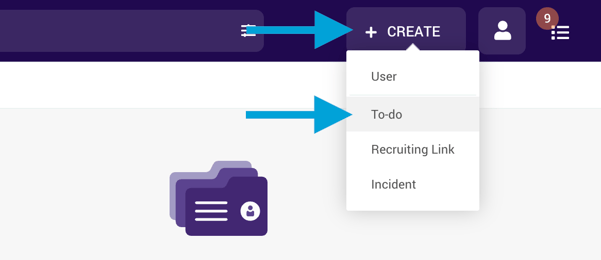
Click the Create button at the top right of DriverHub.
-
Select the To-do option.
-
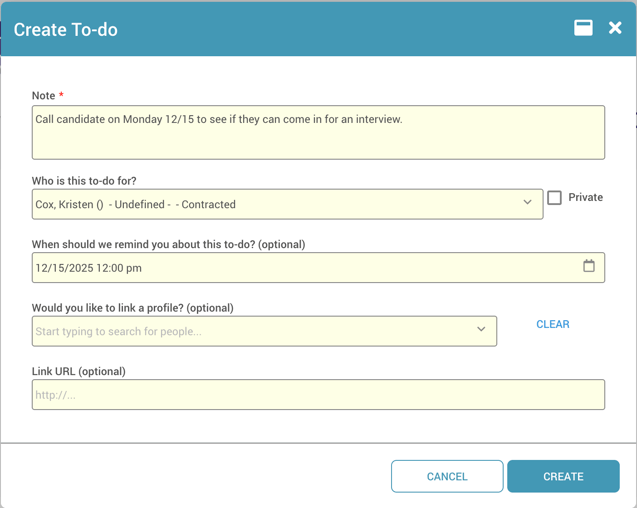
Enter a note for the to-do.
-
Assign the to-do to yourself or another team member.
-
Choose a reminder time (optional).
-
Link a profile or URL (optional).
- Click Create at the bottom right to save.
Create a To-do from a User Profile
-
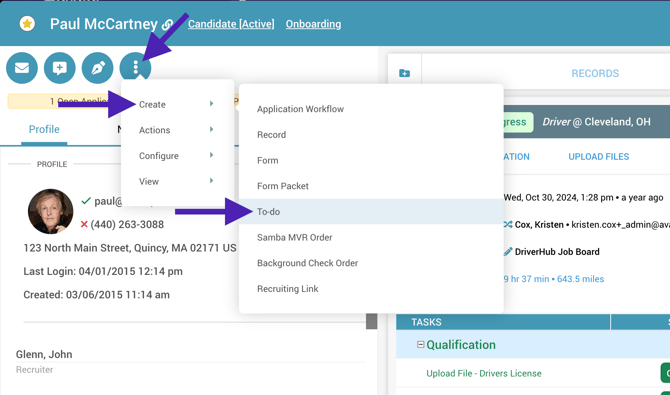
Navigate to the desired candidate or team member's profile.
-
Click on the three dots menu.
-
Select Create, then To-do.
-
Enter a note and assign it to someone or yourself.
-
The profile will be automatically linked.
-
Set a reminder time (optional).
- Click Create at the bottom right to save.
Create a To-do From a Browser Screen
-
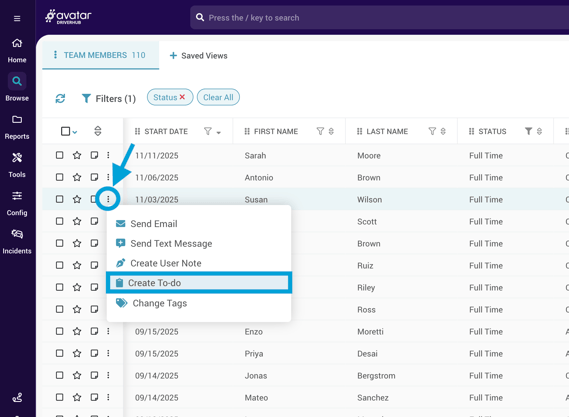
In any browser, click on the three dots to the left of the specific user you would like to work on.
-
Select Create To-do.
-
Enter a note and assign it to someone or yourself.
-
The profile will be automatically linked.
-
Set a reminder time (optional).
- Click Create at the bottom right to save.