
We've updated the DriverHub Side Navigation Menu to make it easier to find the tools you use every day. Based on customer feedback, we reorganized and relabeled key sections so your most important features are always within reach.
No action is required on your end.
What's Changed:
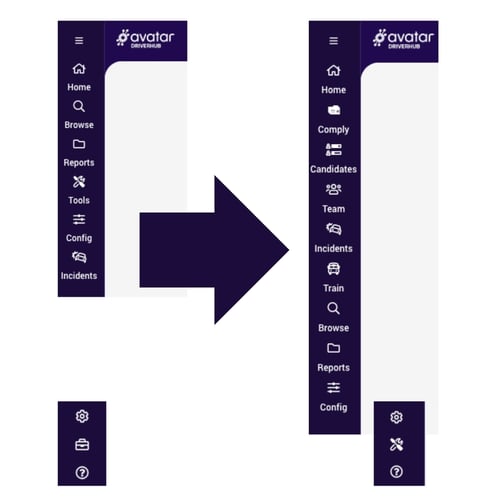
🏠 Home Page Removed
The DriverHub Home Page is going away. It previously served as the starting point for Compliance and Recruit, but those tools are now living directly in the side navigation. Nothing has been lost — everything is just easier to reach.
✅ New: Candidates
The Candidates section is now a dedicated item in the side navigation. You can access your full hiring pipeline directly from the nav without having to dig through menus. Note: This was also known as Recruit via the Home Page.
👥 Team Members → Team
"Team Members" has been renamed to Team. All of your team management tools are in the same place. We just made the label shorter and easier to find at a glance.
📋 Compliance → Comply (Moved from Home Page)
"Compliance" is now Comply, and it has moved from the Home Page into the side navigation. The same powerful compliance tools you rely on are now one click away at all times.
🎓 School Bus Training → Train
"School Bus Training" has been shortened to "Train. This section still houses all your training resources. it's just faster to find now.
⚙️ New: Settings Gear Icon
We've added a Settings Gear Icon to the side navigation. All of your account and application settings are now consolidated in one place.
🔧 Tools Moved to the Bottom
We've combined Tools and Admin Briefcase into one unified section, now located at the bottom of the side nav.
Side Navigation: Before & After
Frequently Asked Questions
Q: Do I need to do anything to get these changes?
If the Home Page was your default landing page, we'll be automatically switching you to the Dashboard. You can always update this anytime in User Preferences.
Q: Has any functionality been removed?
No. All existing tools and features are still available. We've only updated names and reorganized where items appear in the navigation.
Q: Where did my Settings go?
Your settings are now accessible via the gear icon (⚙️) at the bottom of the side navigation. All settings that were previously scattered across the platform have been brought together here.