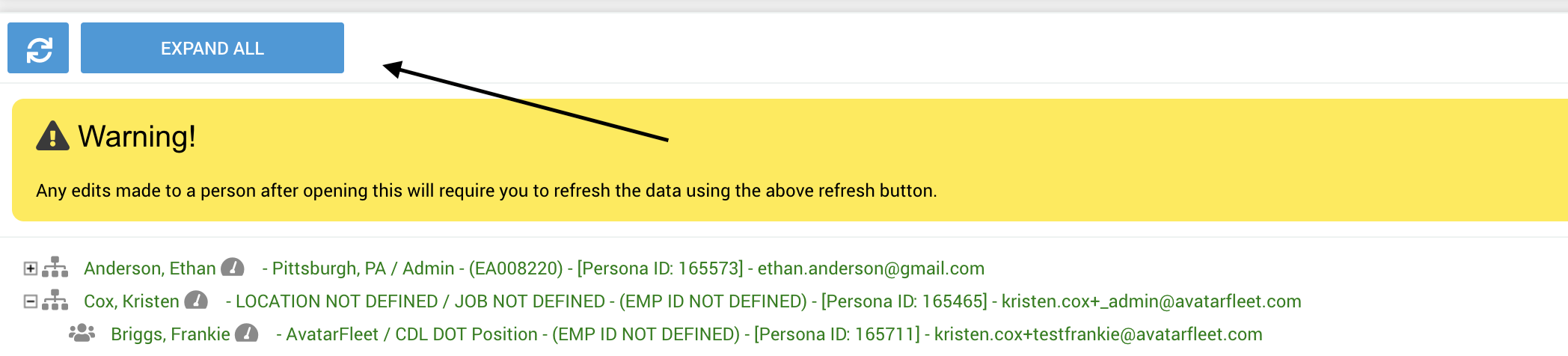
The Company Management Tree in DriverHub allows you to quickly view your organization’s hierarchy and reporting structure. This feature provides a clear visualization of team roles and reporting lines, helping you understand company leadership and structure.
Table of Contents
Video Walkthrough
Step-by-Step Instructions
Follow these simple steps to access your Company Management Tree in DriverHub:
1. In the left navigation panel, click the “Browse” button (represented by a magnifying glass icon).
2. From the menu that appears, select “Management Tree.”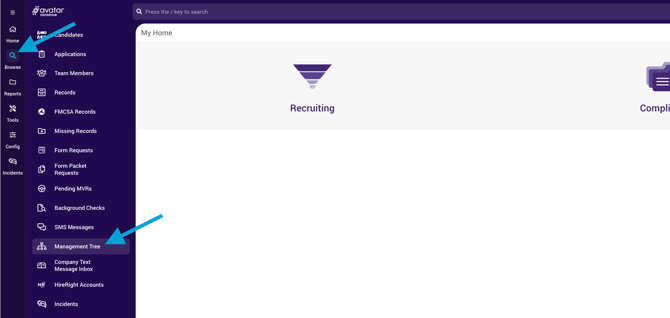
3. The Company Management Tree will now be displayed, allowing you to view your company’s hierarchy.
4. (Optional) Click the “Expand All” button to see all managers and all subordinates without having to expand names individually.